Apple’s iPad lineup continues dominating the tablet market in 2026, but one complaint persists: limited ports. When you’re working with external storage or connecting accessories, that single USB-C port becomes a serious bottleneck. Enter the KUXIU M30 Magnetic Smart Connector Charger, promising to solve this problem cleverly.
After testing the M30 for several weeks, I can confirm it delivers on most promises, but comes with trade-offs you need to understand before purchasing.
What Makes KUXIU M30 Different From Traditional iPad Chargers
Instead of occupying your iPad’s USB-C port for charging, the M30 taps into those three metallic dots positioned just above the port. That’s your iPad’s Smart Connector, originally designed for accessories like Apple’s Magic Keyboard.
Smart Connector Technology Explained
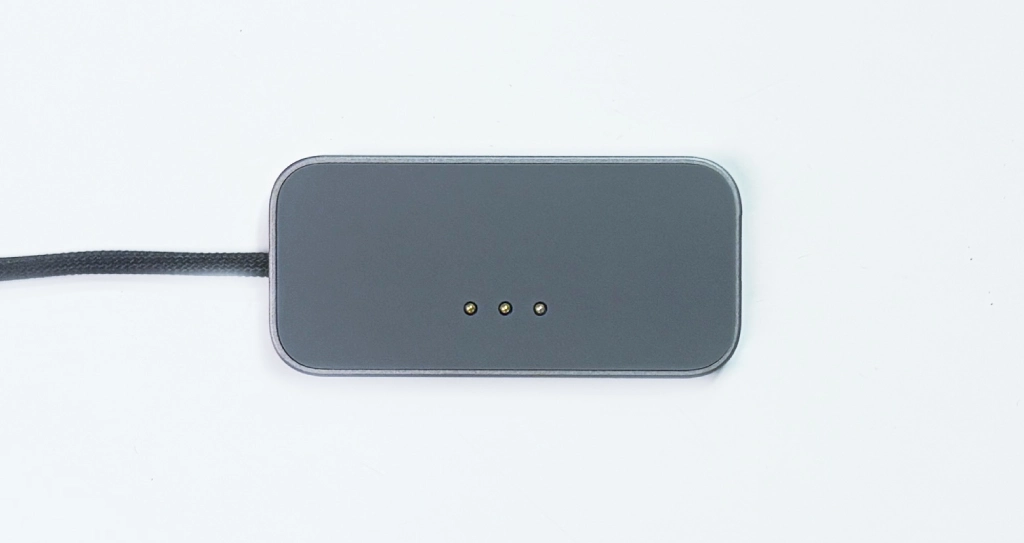
The Smart Connector has been part of iPad Pro and iPad Air models since 2018. These three contact points transmit both power and data. The charger features matching pins that align perfectly with your iPad’s Smart Connector, establishing an immediate power connection the moment contact is made.
According to independent testing using power meters, the M30 delivers a verified 35 watts of charging power, matching traditional USB-C cable connections. This isn’t theoretical marketing speak; it’s measured reality.
How It Compares To MagSafe Charging
Many call the M30 “MagSafe for iPad,” but that comparison deserves nuance. While it uses magnets for alignment similar to MagSafe, actual power transfer happens through physical contact points rather than wireless induction. You get MagSafe-like convenience without efficiency losses.
The magnetic connection is genuinely strong. I needed more than a gentle tug to detach the M30 once properly aligned. This stability matters when working at a desk or moving your iPad between positions.
Unboxing And First Impressions
Inside the box: the magnetic charging puck and an integrated 6.65-foot braided USB-C cable. That cable length is refreshingly practical, reaching wall adapters positioned behind desks without issue.
Build Qualit And Design
The space gray aluminum housing measures 2.6 inches by 1.25 inches with a slim 0.25-inch profile. The backside features rubberized material surrounding three gold-plated contact pins, preventing scratches while ensuring a reliable connection.
One thoughtful detail: a small alignment marker helps you position the charger correctly. What’s missing: a power adapter. You’ll need your own USB-C wall charger rated at 30W or higher for optimal performance.
Real World Performance Testing
We put the M30 through everyday scenarios iPad users actually encounter, from overnight charging to intensive video editing sessions.
Charging Speed Analysis
The 35W power delivery holds up under scrutiny. Using a USB-C power meter, I consistently measured 34-37 watts flowing to my iPad Pro during charging. For comparison, charging via a USB-C cable with an identical power adapter showed virtually identical wattage.
Battery percentages climbed at expected rates. Charging from 20% to 80% took approximately 90 minutes, consistent with Apple’s own charging cable. Testing with an M5 iPad Pro showed maximum power draw reaching 37.1 watts, demonstrating the M30 handles even Apple’s latest fast-charging iPads.
Magnetic Strength And Cable Quality
The magnets embedded in your iPad serve double duty for the M30’s secure connection. The pull force is substantial enough that the charger won’t accidentally disconnect during normal use, yet removal remains easy with moderate force.
The 6.65-foot braided cable resists tangling and maintains flexibility. After weeks of daily use, no fraying or damage appeared. For comparison, if you’ve purchased accessories like the Xiaomi Pad 6S Pro 12.4, you know cable quality matters for daily reliability.
Compatibility Guide For Your iPad
Not every iPad works with the M30. The charger supports iPad Pro models from 2018 onward and iPad Air from the 4th generation forward. Base iPad models and all iPad mini variants lack Smart Connector hardware.
Critical detail: KUXIU manufactures separate versions for 11-inch and 13-inch iPads because magnet positioning differs. Ordering the wrong version means no charging whatsoever. Double-check your iPad model before purchasing.
Case Compatibility Reality
Most iPad cases cover the Smart Connector by design, meaning you’ll likely need case removal to use the M30. Cases with Smart Connector cutouts exist, but limit protective options. Bulky rugged cases won’t work without removal.
Desktop stands present challenges, too. Wide bases can obstruct charger attachment. Slimmer stands designed for naked or minimally-cased iPads work perfectly.
Advantages That Actually Matter
Beyond freeing up your USB-C port, the M30 delivers practical advantages worth highlighting.
USB-C Port Freedom
Charge your iPad while simultaneously connecting external SSDs, USB microphones, HDMI adapters, or Ethernet connections. For content creators working with large video files on external storage, this capability justifies the M30’s existence.
I routinely edited 4K footage from external SSD while the M30 kept my iPad charged throughout multi-hour sessions. Previously, this required either a powered USB-C hub or accepting battery drain.
Reduced Port Wear
USB-C ports aren’t indestructible. Every connection cycle contributes microscopic wear. By moving daily charging to the Smart Connector, you’re preserving your iPad’s USB-C port. The Smart Connector pins handle repeated cycles without degradation.
Honest Drawbacks You Need to Know
Case Removal Requirements
Most cases require removal to access the Smart Connector, diminishing seamless charging. If you value drop protection and keep your iPad constantly cased, you face a choice: remove the case every charging session or accept reduced convenience.
Potential Software Detection Issues
Some users report iPadOS occasionally misidentifies the M30 as a keyboard accessory. When this happens, the on-screen keyboard refuses to appear automatically, requiring manual intervention.
During testing, I encountered this sporadically. It’s not constant, but genuinely frustrating when it occurs. A workaround exists (manually summoning the keyboard), but defeats seamless integration.
This isn’t unique to M30. Other non-Apple Smart Connector accessories exhibit similar quirks, suggesting the issue stems from third-party device interface protocols. Whether future iPadOS updates resolve this remains uncertain.
Price Analysis And Value Comparison
The M30 typically retails between $32 and $45 depending on promotions. At the lower end, it represents reasonable value. At the higher end, you’re approaching quality USB-C hub costs, which offer different but comparable benefits.
Alternatives: basic USB-C cables cost $15-25, but don’t solve single-port limitations. USB-C hubs with power delivery run $40-80, providing multiple ports but adding bulk.
The M30 occupies middle ground, offering specific advantages for users prioritizing simplicity and minimal desk clutter over maximum port expansion.
Final Verdict: Who Should Buy the KUXIU M30?
Purchase the M30 if you regularly connect external accessories while maintaining charge, use your iPad primarily at desks where case removal isn’t hassle, or want to reduce USB-C port wear for long-term longevity.
Skip the M30 if you require iPad in protective case constantly, frequently use iPad in diverse locations where repeatedly attaching charging puck becomes impractical, or own iPad models without Smart Connector support.
The M30 represents clever engineering applied to a real problem. It won’t suit every iPad workflow. For those it does suit, however, it delivers genuine utility that simple cables and hubs can’t replicate.
The freedom to charge via Smart Connector while keeping USB-C available proves more valuable in practice than it sounds. Just ensure your iPad model matches the M30 variant you’re ordering, and consider your case situation carefully before purchasing.