Looking for a wireless mechanical keyboard that doesn’t sacrifice desk space or performance? The Rapoo V700DIY-75 has been making waves among gamers and productivity users who want premium features without the premium price tag. This compact 75% layout keyboard brings tri-mode connectivity, hot-swappable switches, and that signature creamy gasket-mounted sound to desks worldwide.
But does it actually deliver on its promises? After testing real-world performance and comparing it against competitors in the same price bracket, here’s everything you need to know before making a purchase decision.
Key Specifications At A Glance
The V700DIY-75 packs impressive hardware into its compact frame. You’re getting tri-mode connectivity through Bluetooth 5.0, 2.4 GHz wireless, and USB-C wired connection. This flexibility means seamless switching between your gaming PC, work laptop, and tablet without constantly unplugging cables.
The keyboard features 79 keys in a true 75% layout. This includes a full-function row and dedicated arrow keys, eliminating the awkward FN combinations that plague smaller 60% keyboards. Under the hood, pre-lubed Speed Silver linear switches deliver millisecond-fast actuation at 1.2mm travel distance.
Battery life extends up to 60 hours with RGB lighting enabled, or an impressive 800 hours when running in power-saving mode with lighting disabled. The 4000mAh battery supports USB-C quick charging, so you’re never stuck waiting hours for a full charge.
RGB enthusiasts get 16.8 million color options with per-key customization through Rapoo’s A-HUB software. The gasket-mounted structure uses seven layers of sound-dampening foam to eliminate the hollow ping common in budget mechanical keyboards.
Design & Build Quality
The compact 75% footprint saves considerable desk real estate compared to tenkeyless or full-size keyboards. At approximately 326mm wide, it leaves plenty of room for wide mouse movements during fast-paced gaming sessions. The aluminum top plate adds structural rigidity while keeping weight at a manageable 850 grams.
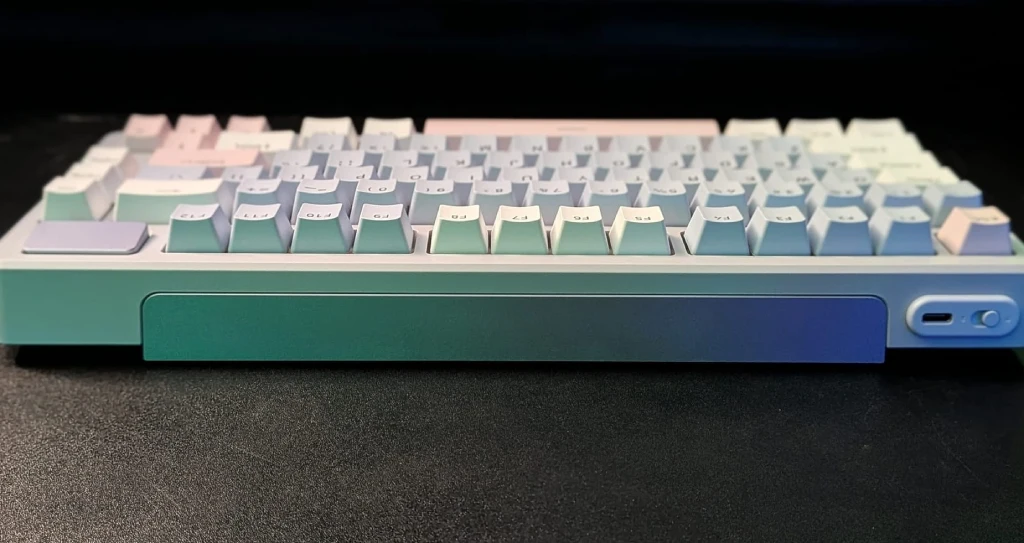
PBT double-shot keycaps resist shine and wear far better than ABS alternatives. The textured surface provides better grip during extended typing sessions, and the legends won’t fade even after years of heavy use. Three color schemes cater to different aesthetic preferences, from subtle office-friendly tones to bold gaming setups.
The gasket-mounted structure, combined with leaf springs and single-key PCB slots, delivers an exceptional typing feel that punches well above its price point iNEWS. Each keystroke feels cushioned and consistent, with none of the rattling or instability found in cheaper alternatives.
The wireless adapter is conveniently in the keyboard’s base. This thoughtful design detail prevents the common frustration of losing tiny dongles during travel or desk reorganizations.
Connectivity & Compatibility
Bluetooth 5.0 supports pairing with up to three devices simultaneously. Switching between paired devices takes seconds through simple FN key combinations. The low-latency wireless technology ensures stable connections without dropout or interference issues.
For competitive gaming where every millisecond counts, the 2.4 GHz wireless mode delivers consistent 1ms response times. The dedicated dongle provides rock-solid connectivity that rivals wired performance in real-world testing.
USB-C wired mode offers a zero-latency connection while simultaneously charging the battery. This means you can keep playing during charging sessions without performance compromises. The keyboard maintains full functionality across Windows and macOS platforms, with proper key mapping for both operating systems.
Switches, Typing Experience & Sound
Speed Silver linear switches represent one of the fastest options in the mechanical keyboard market. With only 1.2mm actuation distance and 35 grams of force required, these switches respond almost instantly to light touches. The 3.4mm total travel distance provides enough feedback to prevent accidental presses during normal typing.
The pre-lubed factory switches eliminate the scratchy feeling found in many budget linear switches. Keystrokes feel smooth from the first press, with consistent resistance throughout the travel. Hot-swap support means experimenting with different switch types requires no soldering skills or technical knowledge.
The seven-layer gasket sound-damping structure effectively absorbs pinging noises and echoes, creating improved keystroke acoustics that sound premium. The result is a deeper, more muted thock rather than the high-pitched clack of cheaper keyboards. This creamy sound profile works equally well in quiet office environments and late-night gaming sessions.
During extended typing tests, the keyboard maintains comfortable ergonomics thanks to three-position angle adjustment. The included rubber feet prevent sliding during intense gaming moments or fast typing bursts.
RGB & Customization
The 16.8 million color RGB system offers genuine per-key control rather than zone-based lighting. This granular control enables creating custom lighting profiles that highlight important keys for specific games or applications. Dynamic lighting effects sync with system events and in-game actions for immersive visual feedback.
Rapoo’s A-HUB software provides intuitive customization without overwhelming complexity. The interface allows remapping any key, creating macros, and saving multiple profiles to onboard memory. Firmware updates happen seamlessly through the same software, ensuring long-term support and bug fixes.
Profile switching happens instantly through FN shortcuts, eliminating the need to open software mid-session. The onboard memory stores up to three complete profiles, meaning your customizations travel with the keyboard between different computers.
Battery Life & Real-World Usage
Real-world battery testing confirms the manufacturer’s claims hold up under normal usage patterns. With RGB lighting at medium brightness, expect around 60 to 70 hours of continuous use between charges. This translates to roughly two weeks of regular eight-hour workdays.
Disabling RGB lighting extends battery life dramatically. Conservative users can easily achieve a full month of daily use before needing to recharge. The USB-C quick charge capability delivers 80% battery capacity in under two hours.
Power-saving features activate automatically after periods of inactivity. The keyboard wakes instantly when detecting keystrokes, with no perceptible lag or connection delay. Battery percentage indicators through the software prevent unexpected shutdowns during important tasks.
Pros & Cons
| Advantages | Limitations |
| Versatile tri-mode connectivity works with multiple devices seamlessly | Linear switches may feel too light and sensitive for heavy-handed typists |
| Hot-swappable switches enable easy customization without soldering | RGB brightness doesn’t match premium keyboards in the $150+ range |
| Compact 75% layout saves desk space while keeping function keys | A-HUB software has a moderate learning curve for first-time users |
| Impressive battery life lasts weeks between charges | No dedicated media controls require FN key combinations |
| Gasket-mounted structure delivers premium creamy sound | Limited to three onboard profiles for on-the-go switching |
| PBT keycaps resist shine and provide excellent durability | The wireless adapter storage compartment requires careful handling |
Comparison: Rapoo V700DIY-75 vs V700DIY-98
The V700DIY-75 and V700DIY-98 share identical internal platforms, with no performance compromises between models in typing feel, connectivity, or build quality. Both keyboards feature the same tri-mode wireless system, hot-swappable Speed Silver switches, per-key RGB lighting, and gasket-mounted construction.
The fundamental difference comes down to layout preference and desk space requirements. The V700DIY-75’s compact 79-key design maximizes mouse movement area, making it ideal for low-sensitivity FPS players who need wide sweeping motions. The smaller footprint also suits minimalist desk setups and smaller workspaces.
The V700DIY-98 with its 1800 layout takes up more horizontal space due to the integrated number pad, but remains more compact than traditional full-size keyboards RAPOO. This makes it practical for users who frequently input numerical data or need dedicated macro keys for MMO gaming and productivity applications.
Neither keyboard offers performance advantages over the other. The choice depends entirely on whether you prioritize maximum desk space efficiency or prefer having a dedicated numpad always available.
Who Should Buy The Rapoo V700DIY-75?
This keyboard excels for compact desk setups where every inch of space matters. FPS gamers and competitive players benefit from the extra mouse movement room the 75% layout provides. The tri-mode connectivity also suits hybrid workers who regularly switch between home office and travel environments.
Budget-conscious enthusiasts get premium features like hot-swappable switches and gasket mounting at a fraction of luxury keyboard prices. First-time mechanical keyboard buyers appreciate the balanced linear switches that work well for both gaming and typing without requiring separate boards.
The keyboard particularly suits users who value wireless flexibility without sacrificing performance. Being able to seamlessly switch between a gaming PC, work laptop, and tablet through a single keyboard streamlines workflow and reduces desk clutter.
Final Verdict: Worth The Money in 2026?
The Rapoo V700DIY-75 delivers exceptional value in the competitive mechanical keyboard market. It brings features typically reserved for keyboards costing $50 to $100 more while maintaining solid build quality and reliable performance. The combination of tri-mode connectivity, hot-swappable switches, and gasket-mounted construction creates a compelling package.
Minor compromises like moderate RGB brightness and the software learning curve pale compared to the overall experience. The keyboard handles daily productivity tasks and gaming sessions equally well, making it a genuinely versatile option rather than a specialized tool.
For anyone seeking a wireless mechanical keyboard that balances compact design with full functionality, the V700DIY-75 stands out as a smart choice. It proves you don’t need to spend premium prices to get premium features and build quality.
Frequently Asked Questions
Does the Rapoo V700DIY-75 support macOS fully?
Yes, the keyboard works seamlessly with macOS through Bluetooth or a wired connection. Key mapping adjusts automatically for Mac layouts, and the A-HUB software provides full customization support on both Windows and macOS platforms.
Can You Replace The Switches Easily Without Soldering?
Absolutely. The hot-swappable design supports both 3-pin and 5-pin mechanical switches. Simply pull out existing switches using the included puller tool and press replacement switches into the sockets. The process takes seconds per switch with zero technical skills required.
How long Does The Battery Actually Last With RGB Lighting Enabled?
Real-world testing shows approximately 60 hours of continuous use with RGB lighting at medium brightness, matching manufacturer specifications. This translates to roughly two weeks of regular eight-hour workdays between charges. Lowering RGB brightness extends this further.
Is The Rapoo A-HUB Software Difficult To Use?
The software features an intuitive interface that most users navigate easily within minutes. While it offers extensive customization options, basic functions like key remapping and lighting control remain accessible without reading documentation. The learning curve exists mainly for advanced macro programming.