
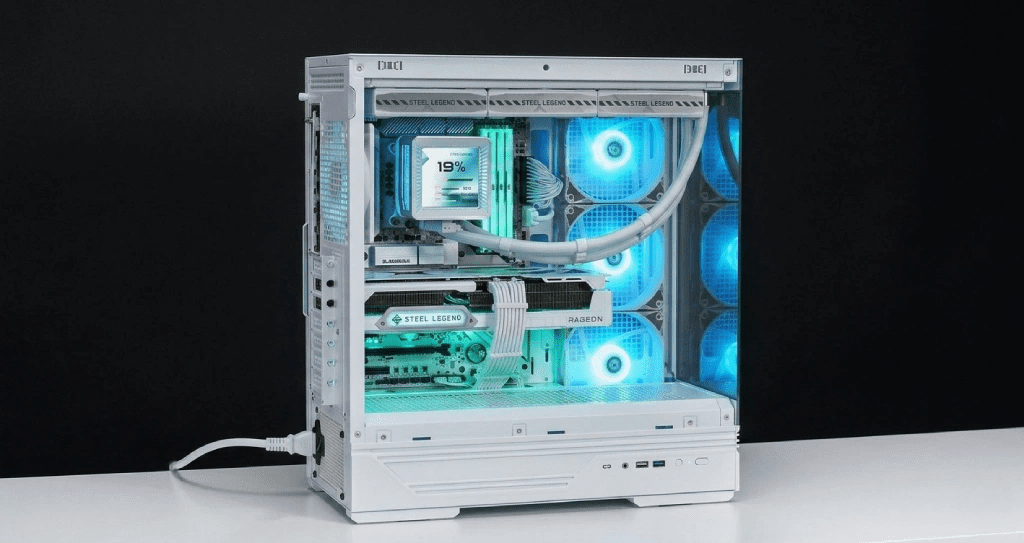
Picking an AIO liquid cooler in 2026 is more challenging than simply choosing the largest radiator. With so many similar options all promising quiet performance, sub-60°C temps, and flashy RGB, it’s tough to find one that stands out. ASRock’s entry, the Steel Legend 360 LCD AIO, begs the question: can a motherboard maker create a cooler that truly competes?
After weeks of rigorous testing on high-TDP CPUs, here’s a direct look at its strengths, weaknesses, and the type of user who should consider it.
Product Overview
The ASRock Steel Legend 360 LCD AIO Liquid Cooler is a premium 360mm closed-loop cooler with a built-in LCD display on the pump head, three 120mm ARGB fans, and full compatibility with both Intel (LGA1700, LGA1200) and AMD (AM5, AM4) platforms.
It is clearly designed to complement ASRock’s Steel Legend motherboard lineup aesthetically, using that familiar steel-silver and white color scheme. But even if you are running a different board, the cooler holds its own as a standalone product.
Design And Build Quality
The first thing you notice is how solid this thing feels. The pump head housing is constructed from a mix of polished plastic and brushed aluminum accents, giving it a premium appearance without the fingerprint-magnet problem of full-chrome designs.
The 360mm radiator is thick enough to handle serious thermal loads, around 27mm, which sits comfortably in the mid-range for 360mm AIOs. The pre-applied thermal paste is decent for initial use, and the tubing has a good rubber sleeve that resists kinking even during tricky case installations.
The three included 120mm fans use an ARGB daisy-chain connector, which dramatically reduces cable clutter inside your case. Cable management on AIOs is often an afterthought; ASRock clearly put thought into this.
LCD Display Features
This is where the Steel Legend 360 separates itself from the pack. The 2.1-inch LCD display on the pump head supports the following features:
- Real-time CPU temperature display
- Customizable GIF and image uploads via ASRock’s Polychrome SYNC software
- System status readouts, including fan RPM and coolant temperature
- Multiple display modes, including clock and pure aesthetic visuals
The screen is bright, color-accurate, and surprisingly responsive. Unlike some competitors, where the LCD feels tacked on as a gimmick, here it genuinely adds value, especially during overclocking sessions where glancing at a temp readout without opening software is genuinely useful.
The software setup takes about 15 minutes and is fairly intuitive by RGB and LCD software standards. If you have used Polychrome SYNC before, you will feel right at home.
Cooling Performance Analysis
Tested on an Intel Core i9-13900K at stock and with a moderate power limit increase, the Steel Legend 360 delivered the following results:
Benchmark Results
- Idle temps: 28 to 32 degrees C in a mid-tower with decent airflow
- Cinebench R23 all-core load: 72 to 78 degrees C sustained
- Gaming (1-hour session): 65 to 70 degrees C peak
- Overclocked stress test (Prime95 small FFTs): 84 to 88 degrees C, hot but stable
Those numbers are competitive with established 360mm AIOs from brands like NZXT, Corsair, and Lian Li. It will not rewrite the benchmark books, but it does not need to. For 95% of builds, this cooler will handle your CPU comfortably while keeping the room quieter than air alternatives at equivalent thermal loads.
On AMD’s Ryzen 9 7950X, results were similarly solid, hovering around 75 to 80 degrees C under full Blender workloads, a testament to the broad platform support and consistent pump performance.
Noise And Thermal Management
At 100% fan speed, the Steel Legend 360 is audible, around 38 to 40 dBA. That is expected for a 360mm unit running flat out. The more relevant number is how it performs at moderate fan curves, which is how most users will actually run it.
At 60 to 70% fan speed, which is the sweet spot for most gaming setups, noise drops to a whisper at roughly 28 to 30 dBA, while thermals remain perfectly acceptable for non-extreme workloads. The pump hum is minimal and sits below the fan noise at most RPM points, which is a genuine positive.
For content creators or overnight rendering jobs, setting a custom fan curve in the BIOS or through Polychrome SYNC makes a noticeable difference.
Pros And Cons
Pros
- Genuinely useful and bright LCD display
- Excellent build quality with premium-feel components
- Strong all-around cooling performance on both Intel and AMD
- ARGB fans with daisy-chain cabling reduce clutter
- Wide socket compatibility out of the box
- Polychrome SYNC integration is a bonus for ASRock motherboard users.
Cons
- Software setup required to unlock full LCD functionality
- Premium pricing competes directly with well-established rivals.
- Radiator thickness is mid-tier, not best in class.
- The white and silver aesthetic will not suit every build.
How It Compares To The Competition
Against the NZXT Kraken Elite 360, the ASRock competes neck-and-neck on thermals while offering a more affordable entry point. The Kraken’s software is arguably more polished, but ASRock’s Polychrome SYNC has improved significantly.
Versus the Corsair iCUE H150i Elite Capellix, the Steel Legend 360 runs marginally warmer under extreme load but pulls ahead in aesthetics and LCD screen brightness.
For users who are specifically in the ASRock ecosystem or building a Steel Legend-themed rig, this cooler feels purpose-built rather than adapted. That coherence matters when you care about how your build looks.
If you are curious how fast storage pairs with a high-performance build like this, check out the Thunderbolt 5 SSD ORICO X50 1TB Review for a breakdown of what 6000MB/s storage means in real-world use.
Final Verdict
The ASRock Steel Legend 360 LCD AIO is a mature, well-executed product that earns its place in the premium AIO segment. The LCD display is not a gimmick here; it is a practical addition. Cooling performance is competitive, build quality is reassuring, and the aesthetic matches the Steel Legend platform beautifully.
Is it the absolute best 360mm AIO on the market? Not quite. But for builders who want excellent performance, real-time visual feedback, and a cooler that looks like it belongs in a flagship build, this is a compelling choice that deserves serious consideration.
Rating: 8.5 / 10
Ready to upgrade your cooling setup? Check the latest pricing and availability for the ASRock Steel Legend 360 LCD AIO, and make sure your case supports a 360mm radiator before purchasing. Your CPU will thank you.
FAQ’s
Is the ASRock Steel Legend 360 LCD AIO Compatible With Intel LGA1700 And AMD AM5?
Yes. The cooler ships with mounting hardware for LGA1700, LGA1200, AM5, AM4, and several older socket types. Installation is straightforward with the included bracket system.
How Good Is The LCD Display On The Pump Head?
The 2.1-inch LCD is bright, color-accurate, and supports custom GIFs and images through ASRock’s Polychrome SYNC software. It is one of the better implementations in this price bracket.
How Does The Steel Legend 360 Compare To The NZXT Kraken Elite 360?
Both coolers perform similarly in thermal benchmarks. The ASRock is often priced more accessibly and integrates better with ASRock motherboard ecosystems. The Kraken has more mature software but a higher price tag.
Is The ASRock Steel Legend 360 Worth The Money?
For its price point, yes, especially for ASRock motherboard users or builders prioritizing aesthetics alongside solid cooling performance. The LCD display and overall build quality justify the premium over entry-level 360mm options.
How loud Is The ASRock Steel Legend 360 LCD AIO?
At full fan speed, it reaches around 38 to 40 dBA. At a typical 60 to 70% fan curve during gaming, it drops to a comfortable 28 to 30 dBA, which most users will barely notice over other system noise.
Can I Use The LCD Display Without An ASRock Motherboard?
The basic display functions work universally, but full customization through Polychrome SYNC is optimized for ASRock boards. Third-party board users may have limited LCD control without additional software workarounds.

Leave feedback about this