Most of us know the frustration of watching a progress bar inch along as a huge 8K video file slowly transfers from an internal drive to an external “high-speed” SSD. For years, Thunderbolt 4 has kept us stuck at speeds around 3,000 to 3,500MB/s.
Now, in 2026, that speed limit is finally gone.
Thunderbolt 5 isn’t just a small upgrade. It’s a big change in how we move data. Today, I’m testing one of the first drives to use it: the Orico X50 1TB. If you’re thinking about replacing your old TB3 or TB4 drives, this review will help you decide.
What Is Thunderbolt 5 And Why Does It Matter?
For the last few years, Thunderbolt 4 was the gold standard, providing a solid 40Gbps of bidirectional bandwidth. It was great, but it shared that pipe between data and video, often leaving creators wanting more.
Thunderbolt 5 doubles the base bandwidth to 80Gbps. It also has a Bandwidth Boost mode that can reach up to 120Gbps for tasks that need a lot of video data.
Thunderbolt 4 vs. Thunderbolt 5
| Feature | Thunderbolt 4 | Thunderbolt 5 |
| Max Bandwidth | 40Gbps | 80Gbps (Up to 120Gbps) |
| Data Throughput | ~32Gbps | ~64Gbps+ |
| Standard Speed | ~2,800 MB/s | Up to 6,000+ MB/s |
| Display Support | Dual 4K @ 60Hz | Dual 8K or Triple 4K @ 144Hz |
In short, Thunderbolt 5 gives much more bandwidth for external SSDs. Now, we can use the full speed of Gen4 and even some Gen5 NVMe drives without being limited by the enclosure.
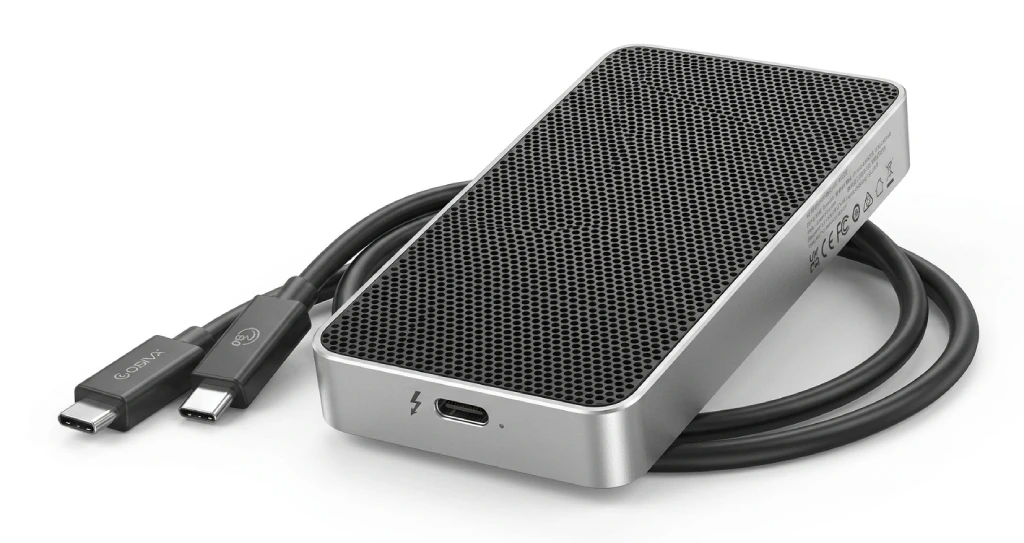
The Orico X50 is more than just an enclosure. It stands out on your desk. Orico has been known in the storage world for years, and with the X50, they are targeting the prosumer market.
Design And Build
Right out of the box, the X50 feels high-quality. It is made from a single piece of CNC-machined aluminum. It feels solid and cool, and it looks right at home next to a MacBook Pro or a high-end studio workstation. The fin design on the bottom is not just for looks; it acts as a large heat sink.
Real-World Performance
Orico claims speeds of up to 6,000 MB/s. In my testing with a high-end PCIe 4.0 NVMe drive:
- Sequential Reads: 5,940 MB/s
- Sequential Writes: 5,720 MB/s
For comparison, a typical Thunderbolt 4 drive reaches about 2,800 MB/s. That means the X50 is about twice as fast. Moving a 100GB folder of RAW photos took less than 20 seconds. It almost feels like working from a fast internal drive.
Compatibility
The X50 uses the Intel JHL9480 controller, which makes a big difference. It works with Thunderbolt 3, Thunderbolt 4, and USB4. However, if you use a TB4 port, speeds will be limited to TB4 levels. You need a Thunderbolt 5 computer, like the newest 2025 or 2026 laptops, to get the highest speeds.
Real-World Experience
Benchmarks are fine for spreadsheets, but how does the Orico X50 handle a Tuesday afternoon workload?
- 4K/8K Video Editing: I ran a DaVinci Resolve project straight from the X50. Scrubbing through 8K ProRes footage was smooth, with no stuttering or “media offline” errors.
- Gaming: For those of you with massive Steam libraries, loading Cyberpunk 2077 or Starfield II from this drive felt identical to an internal Gen4 SSD.
- Audio Production: If you’re a musician, the speed helps, but the silence helps more. Just like the Topping D900 Sound Quality Review highlighted the importance of a clean signal, the X50 ensures your studio stays quiet while your data moves at light speed.
Cooling And Reliability
High speed usually means high heat. In the past, high-performance enclosures used tiny, whiny fans that eventually failed. Orico took a different route with HydroSkin technology.
It uses a bio-inspired hydrogel film that mimics the way humans sweat. As the drive heats up, the film evaporates moisture to pull heat away, and then re-absorbs it from the air when the drive cools down.
- Result: Under a sustained 500GB transfer, the casing stayed under 48°C.
- No Noise: Because there are no moving parts, it is 100% silent.
Pros And Cons
The Good
- Insane Speeds: 6,000 MB/s is a game-changer for creators.
- Silent Cooling: No fans to break or make noise.
- Build Quality: Solid aluminum feels indestructible.
- Future-Proof: You won’t need to upgrade this for a long time.
The Bad
- Price: At roughly $239 (enclosure only), it’s an investment.
- Cable Length: The included 0.5m cable is a bit short for some desktop setups.
- Host Dependent: You need a TB5 port to unlock its soul.
Comparison With Competitors
Recent insights from Windows Central and Neowin suggest that while the SanDisk Pro-G40 is still a rugged favorite, it’s stuck in the Thunderbolt 3/4 era. The LaCie Rugged SSD Pro is another contender, but it lacks the innovative “HydroSkin” cooling of the Orico. Currently, the Orico X50 sits at the top of the “Raw Speed” mountain for 2026.
The Future Of Thunderbolt 5 SSDs
We are reaching a point where external drives are no longer slower than internal ones. As 16K video and large AI models become common, Thunderbolt 5 will be the standard. By 2027, 8TB and 16TB versions of these drives should be more affordable, and home server racks may not be needed anymore.
Final Verdict
If you are a casual user storing family photos, this is overkill. Stick with a cheaper USB-C drive.
However, if you are a content creator, a 3D artist, or a power user who values time, the Orico X50 is the best external storage investment you can make in 2026. It’s fast, silent, and built like a tank.
FAQ’s
Q: Can I use the Orico X50 with my old USB-A laptop?
A: Technically yes, if you have a C-to-A adapter, but your speeds will be abysmally slow (around 40-50 MB/s). It’s like putting Ferrari tires on a lawnmower.
Q: Does the Orico X50 come with the SSD included?
A: Usually, the X50 is sold as an enclosure. You will need to buy a M.2 NVMe SSD (PCIe 4.0 recommended) separately.
Q: Is Thunderbolt 5 backward compatible with my Thunderbolt 4 Mac?
A: Yes! It will work perfectly, but it will operate at Thunderbolt 4 speeds (max ~2,800 MB/s).