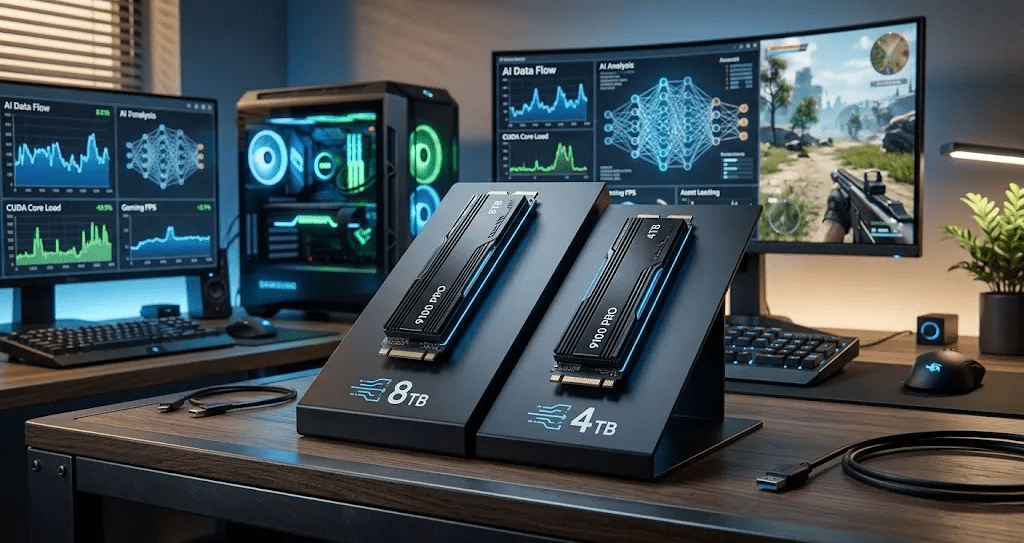
You just opened your PC case, slot ready, wallet in hand, and now you’re staring at two options: the Samsung 9100 Pro 4TB or the 8TB. Both are premium NVMe drives. Both are built for serious workloads. But they are not the same purchase decision, and picking the wrong one could mean either wasting money or running out of space within months.
This comparison cuts through the spec-sheet noise and gives you a straight answer based on how people actually use these drives in 2026.
What Is The Samsung 9100 Pro?
The Samsung 9100 Pro is Samsung’s flagship PCIe 5.0 NVMe SSD, built for users who push storage to its limits. It uses Samsung’s 9th-generation V-NAND and an in-house controller that delivers sequential read speeds up around 14,800 MB/s and write speeds touching 13,400 MB/s. These numbers are not marketing fluff. For AI inference, large game streaming, and video editing workflows, the performance difference versus older PCIe 4.0 drives is real and noticeable.
Both the 4TB and 8TB versions share the same controller and NAND architecture. That matters because you are not getting a slower drive when you go bigger. What you are getting is more raw capacity and, in most workloads, slightly better sustained write endurance due to the larger NAND pool.
Key Differences: 4TB vs 8TB
| Feature | 4TB | 8TB |
| Sequential Read | ~14,800 MB/s | ~14,800 MB/s |
| Sequential Write | ~13,400 MB/s | ~13,400 MB/s |
| TBW (Endurance) | ~2,400 TBW | ~4,800 TBW |
| Typical Price (2026) | ~$280 to $320 | ~$520 to $600 |
| Heat Under Load | Moderate | Slightly higher |
The peak speeds are identical. The endurance is where the 8TB pulls ahead significantly. For workloads that write data constantly, like AI model training or daily 4K video exports, the double TBW rating on the 8TB matters over a multi-year ownership period.
Thermal behavior is worth noting. The 8TB runs slightly warmer under sustained loads. If your case airflow is poor or you are using a compact ITX build, that extra heat needs to go somewhere. A good heatsink is not optional on either drive, but it becomes more important with the 8TB.
Performance For AI Workloads
This is where the 8TB genuinely earns its price premium for a specific type of user. AI developers working with large language models, diffusion model checkpoints, or training datasets regularly hit the 2TB to 4TB range for a single project. Running multiple models or keeping several datasets active at once can push you past 4TB surprisingly fast.
On the raw performance side, both drives deliver comparable speeds for inference tasks. But the 8TB’s higher sustained write endurance is a real advantage if you are writing and rewriting large model weights repeatedly across training cycles. The 4TB is not slow. It is just a tighter fit if you are doing serious local AI work.
Gaming Performance Comparison
For gaming alone, the 4TB is the smarter buy in almost every case. Modern AAA games range from 50GB to 150GB each. Even a large library of 30 to 40 games sits comfortably within 4TB, with room left over for clips, screenshots, and system storage.
The speed difference between 4TB and 8TB is undetectable in gaming. Load times, shader compilation, and open-world streaming are bottlenecked by game engine design long before your NVMe speed becomes the limiting factor. Spending an extra $250 on the 8TB purely for gaming is hard to justify.
If you pair your gaming rig with content creation or keep large video projects on the same drive, that calculus shifts. A gaming and streaming PC that doubles as an editing workstation is a legitimate case for the 8TB.
Who Should Buy The 4TB?
The 4TB is the right call if you are building a dedicated gaming PC, running a home media server, or doing light creative work. It gives you serious performance headroom, a respectable endurance rating, and costs noticeably less. Most users will not fill 4TB quickly unless they have a very specific workflow.
If you use multiple peripherals or need fast data transfer on top of internal storage, pairing a fast NVMe with a reliable docking station matters too. Check out this guide on the best USB-C hubs and docking stations if your setup involves external drives or multi-device connectivity.
Who Should Buy The 8TB?
The 8TB makes sense if you fall into one of these categories:
- You are training or fine-tuning AI models locally and managing multiple large datasets
- You do professional video work with RAW footage from multiple projects stored simultaneously
- You run a NAS-adjacent PC where a single high-capacity NVMe drive is more practical than multiple drives
- You want a drive you genuinely will not outgrow for five or more years
The 8TB is a forward-thinking buy. It is not cheap, but for the right workload it eliminates the need to shuffle files or add secondary drives.
Real User Concerns (From The Community)
Reddit threads on the Samsung 9100 Pro raise a few consistent questions worth addressing directly.
“Will the 8TB overheat in my system?”
It can run warm. Make sure you are using a quality heatsink and have at least one fan moving air across the M.2 slot. Sustained sequential writes generate real heat on any high-speed PCIe 5.0 drive.
“Is the 8TB worth it just for a gaming PC?”
Honestly, no. Unless you also create content, run AI tools, or store massive libraries of uncompressed media, you are paying a significant premium for capacity you will not use.
“What about the price per GB?”
The 4TB typically offers better value at current pricing. The 8TB costs more per gigabyte, but the endurance and capacity justify it for power users.
Final Verdict
For most people, the Samsung 9100 Pro 4TB is the better purchase. It delivers the same peak speeds, costs significantly less, and handles gaming and everyday creative tasks without compromise.
If you are running local AI workloads, managing large datasets, or need a drive that stays future-proof for years of heavy use, the 8TB is worth the investment. You are not paying for speed. You are paying for headroom and longevity.
Pick based on your actual workflow, not your aspirational one.
FAQ’s
Q: Is the Samsung 9100 Pro 8TB overkill for gaming?
For most gamers, yes. 4TB is plenty for even the largest game libraries, and you will not notice any speed difference in gameplay.
Q: Does the 8TB run significantly hotter than the 4TB?
Marginally. Both drives need adequate airflow and a heatsink under sustained load. The 8TB is slightly more demanding thermally, particularly during long sequential write sessions.
Q: Which is a better SSD for AI workloads in 2026?
The 8TB is better suited for AI model training and large dataset management. The 4TB works fine for inference and lighter development tasks.
Q: Can I upgrade from 4TB to 8TB later?
Not as an upgrade. You would need to buy the 8TB separately and migrate your data. If you think you will need the space within a year or two, buying the 8TB now saves the hassle.
Q: Is the Samsung 9100 Pro compatible with PCIe 4.0 motherboards?
Yes, it is backward compatible. You will not get full PCIe 5.0 speeds on a PCIe 4.0 slot, but the drive will still function at PCIe 4.0 speeds.