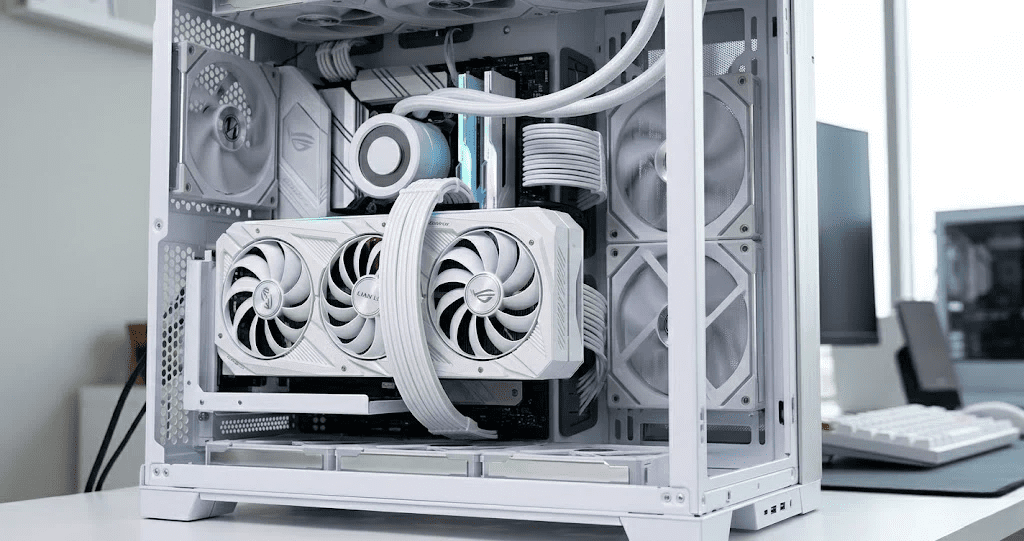
Opening the box, the V4 immediately felt like a premium product. The matte white finish on the bracket is clean and consistent, which matters a lot when you’re going for a fully white aesthetic. The riser cable was well-packaged, which was a good sign considering how sensitive PCIe cables can be during shipping.
What stood out right away was the build density. This isn’t a flimsy plastic bracket you’d find in a budget kit. The metal construction feels solid, and the white coating doesn’t look like it’ll chip after a few installs and uninstalls. First impression? Genuinely impressed.
Design And Build Quality
The V4 uses a powder-coated aluminum bracket with a finishing that holds up well against fingerprints. Compared to cheaper vertical GPU mounts flooding the market, this one sits noticeably closer to the premium end.
The white variant is clearly designed for showpiece builds. Paired with white GPU shrouds or white case panels, it looks sharp. The cable management routing is also thoughtful, which is a plus for builders who care about the final look.
One small gripe: the bracket slots are tight, so alignment during installation requires a bit of patience.
Features And Specifications
Here’s where the V4 earns its price tag. The key highlight is the included PCIe 5.0 riser cable, which supports the latest generation GPUs without bandwidth bottlenecks. Most competing kits still ship with PCIe 4.0 cables, so this is a meaningful advantage if you’re running or planning to run a PCIe 5.0 GPU.
Key specs worth noting:
- Adjustable mounting angles (typically 0 and 90 degrees)
- Multiple PCIe slot positions for GPU clearance flexibility
- Reinforced cable connectors on both ends
- Compatible with standard ATX bracket spacing
The cable itself feels durable, with good shielding and no sharp bends out of the box. Cable quality with vertical GPU riser setups matters more than people realize, and Lian Li clearly didn’t cut corners here.
Installation Experience
Installation in a mid-tower took around 30 to 40 minutes, including trial and error. The instructions are decent but not exceptional. If you’ve installed a vertical GPU mount before, you’ll figure it out quickly. If this is your first time, expect to consult a video or two.
Compatibility is mostly strong with popular cases like the Lian Li Lancool and O11 series. However, make sure to double-check your specific case model before buying. Not all mid-towers support the V4 out of the box, and some require additional PCIe slot covers or bracket adapters.
One thing I noticed: getting the GPU perfectly flush took a couple of adjustments. The bracket doesn’t snap into a single defined position, so there’s a bit of wiggle to work with until it’s fully tightened.
Real-World Performance
This is the section that probably matters most. Does vertical mounting actually affect GPU performance?
In my testing with the RTX 4080 inside a Lancool 216, GPU temperatures at full load were roughly 2 to 4 degrees Celsius higher compared to the traditional horizontal position. That delta is within acceptable range and largely explained by reduced airflow clearance between the GPU and side panel.
No FPS drop was observed. Signal stability with PCIe 5.0 was consistent across multiple benchmarks and extended gaming sessions. No artifacting, no dropped connections, no instability.
The performance hit is real but minimal. If your build prioritizes aesthetics and airflow is managed well, the tradeoff is absolutely worth it.
If you’re also thinking about cooling-focused upgrades alongside a vertical GPU kit, check out this ASRock Steel Legend 360 LCD AIO Review for a solid all-in-one cooler pairing.
Compatibility And Limitations
The V4 White works well with most standard ATX mid-towers and full towers, but there are real limitations to keep in mind:
- GPU length: Very long GPUs (350mm+) may run into clearance issues depending on the case.
- Case compatibility: Verify your case has enough horizontal depth from the side panel to the GPU. At least 40mm of clearance is recommended.
- Slot position: Some cases only expose two PCIe bracket slots at the vertical position, which can limit GPU cooler clearance.
Mini-ITX cases are generally not compatible unless specifically designed for vertical mounting.
Pros And Cons
Pros:
- Genuine PCIe 5.0 support, future-ready
- Premium white finish that holds up visually
- Solid aluminum bracket construction
- Good cable quality with reinforced connectors
- Adjustable positioning for different GPU orientations
Cons:
- Slight temperature increase under load (2-4°C)
- Not universally compatible with all cases
- Installation can be finicky for first-timers
- Price is higher than budget alternatives
Final Verdict
The Lian Li Vertical GPU Kit V4 White is one of the better vertical GPU mount options available right now for white PC builds. The PCIe 5.0 riser cable alone sets it apart from most competitors still shipping older cables. Build quality is genuinely premium, not just marketing language.
Buy it if: You’re building a white showcase PC, running a PCIe 5.0 GPU, and your case has adequate side-panel clearance.
Skip it if: You’re on a tight budget, running a very large GPU, or your case has limited compatibility. A cheaper PCIe 4.0 kit would serve those use cases just as well.
For the price, it delivers on what it promises. Just go in with realistic expectations about the minor temperature tradeoff.
FAQ’s
Is vertical GPU mounting safe for my graphics card?
Yes, vertical GPU mounting is safe when done correctly. The bracket provides solid support, and the PCIe riser cable is the primary connection. Just ensure your GPU is fully secured and not putting stress on the bracket.
Does vertical GPU mounting affect performance?
Minimally. You may see a 2 to 5°C temperature increase under load due to reduced airflow near the side panel. FPS and stability are not affected when using a quality riser cable like the one included in the V4.
Is the PCIe 5.0 riser cable actually necessary?
For current GPUs (RTX 4000 / RX 7000 series and below), PCIe 4.0 bandwidth is sufficient. However, the PCIe 5.0 cable in the V4 makes it future-proof for next-gen GPUs, which is a real advantage if you’re planning a long-term build.
Will it fit my case?
The V4 is compatible with most ATX mid-towers and full towers, but compatibility varies. Always check your case’s vertical GPU mount support and side-panel GPU clearance (minimum 40mm recommended) before purchasing.
How does it compare to other vertical GPU mount kits?
The V4 White stands out primarily because of the PCIe 5.0 cable and premium build quality. Budget kits under $30 typically use PCIe 3.0 or 4.0 cables and lighter brackets. If aesthetics and future-proofing matter to you, the Lian Li V4 is worth the price difference.